Sunday, August 6, 2023

SQL Server Editions: Balancing Availability, Downtime, and Cost

Choosing between SQL Server editions requires a careful balance of high availability benefits against cost implications. For applications that rely on multiple databases, this decision is paramount.

Availability and Downtime:

  • SQL Server Enterprise Edition: This edition supports Always On Availability Groups, allowing multiple databases to be included in a single group. In the event of a database failure, all databases in the group failover together, ensuring application consistency. This feature is pivotal for applications that depend on multiple databases.

  • SQL Server Standard Edition: The Standard edition only supports Basic Availability Groups, limiting it to a single database per group. This means if one database fails, it doesn't guarantee the failover of other related databases, potentially causing inconsistencies in applications relying on multiple databases.

For applications requiring multiple databases to failover together for consistent performance, the Enterprise edition emerges as the preferred choice.

Cost Comparison:

  • SQL Server Enterprise Edition: At 4vCPU and 16GB RAM, the cost is higher but offers advanced features.

  • SQL Server Standard Edition: The same configuration is more budget-friendly but might lack some advanced features.

While the Enterprise edition offers advanced features, it comes at a higher cost. If budget constraints are significant and the application can tolerate some downtime, the Standard edition, combined with workarounds like Log Shipping, becomes a viable option.

Log Shipping:

  • This method involves periodic backups of the transaction log from the primary database, which are then restored on a secondary database.

  • If the primary database fails, the secondary database must be manually activated, which can be time-consuming, especially for large databases.

Variables to Consider in Decision-Making:

  1. Number of Databases: For applications that rely on multiple databases, the Enterprise edition is more suitable.

  2. Availability Requirements: If high availability is paramount, the Enterprise edition is the recommended choice.

  3. Future Scaling: Anticipating growth in user base or data volume? The Enterprise edition, with its advanced features, is a better long-term investment.

  4. Cost: While the Standard edition is more budget-friendly, it might require workarounds that could impact RTO.

Conclusion:

For applications that rely on multiple databases and require high availability, the SQL Server Enterprise edition is a clear frontrunner. However, it's essential to balance this need against cost constraints and evaluate the potential implications of workarounds in the Standard edition. Making an informed decision now can save time, and money, and ensure consistent application performance in the long run.

Friday, April 28, 2023

AWS Secret Manager for application running on Amazon EC2 instances

Using AWS Secret Manager


Introduction

This technical document describes the approach of using AWS Secrets Manager to securely manage secrets and credentials for application running on Amazon EC2 instances. The document outlines the steps to configure the necessary infrastructure components, including AWS Secrets Manager, AWS Identity and Access Management (IAM), and Azure DevOps.

Solution defined in the document is generic and can be applied to programs planning to implement AWS secret manager in their respective projects leveraging Azure Devops

Approach

The approach described in this document consists of the following steps:

·        Configure AWS Secrets Manager to store secrets

·        Create an IAM policy for the EC2 instance to access Secrets Manager

·        Configure Azure DevOps to fetch secrets from Secrets Manager

·        Pass secrets to the .NET Core application using environment variables or application config


Detailed Solution

1.      Configure AWS Secrets Manager to store secrets

·        Create a new secret in AWS Secrets Manager for each environment (dev, qa, prod) that the application uses

o   Non Prod

§  Dev_Secrets

§  QA_secrets

§  Qualif_Secrets

o   Prod Secrets

§  Prod_Secrets

·        Alternately we can also store all environment secrets per service.

Note - If you have a small number of services and environments, storing all environment secrets per service may simplify secret management and reduce the risk of misconfigurations. However, if you have a large number of services and environments or require more flexibility, storing secrets per environment may be a better approach.

If you are expecting to develop multiple micro services hence it’s better to go for storing secrets per environment


·        Store all the secrets for each environment as a key-value pairs in JSON format


2.      Create an IAM policy for the EC2 instance to access Secrets Manager

·        Create IAM Users for prod and non-prod environments

o   Generate AWS access key and secret access key

o   Access Type – Programmatic Access

·        Attach Policy SecretsManagerRead to Users created in step 2

·        If we push the secret to App.config then this is not required

o   Attach IAM roles for EC2 instances for applications to access Secret manager at runtime

o   Attach the appropriate AWS managed policy that grants permissions to access Secrets Manager


3.      Configure Azure DevOps to fetch secrets from Secrets Manager

·        Create a new service connection in Azure DevOps for AWS, using the IAM credentials for accessing Secrets Manager

o   Navigate to the "Project Settings" in Azure DevOps and click on "Service connections".

o   Click on "New service connection" and select "AWS".

o   Follow the prompts to enter your AWS access key and secret access key, as well as the region where your AWS resources are located.

4.      Create a new pipeline variable in Azure DevOps for the secret name:

o   In the Azure DevOps pipeline, define variable (e.g., "EnvironmentSecret") and set the value to the name of the secret that you want to fetch from AWS Secrets Manager.

§  E.g: EnvironmentSecret = Dev_Secrets’ – to Identify Build environment

§  Refer secret name created in Step 1


5.      Add an Azure DevOps task to fetch the secret:


o   In Azure DevOps pipeline, add a task that fetches the secret from AWS Secrets Manager.

o   aws secretsmanager get-secret-value --secret-id $(EnvironmentSecret) --query SecretString --output text

o   aws secretsmanager get-secret-value --secret-id EnvironmentSecret --query SecretString


6.      Pass the secret value to your .NET Core application

There are multiple options to store the secret . This can be evaluated and agreed upon


o   Use Environment Variable in EC2

§  Via Azure DevOps task and update environment variable in EC2

§  MySecretName ={ SecretString }


(OR)

o   Use configuration files

§  Via Azure App Service Deploy task to deploy the configuration file to the Azure App Service that hosts your .NET Core application


o   Store the Output secret value from the previous step into a Key value pair

o   Create new Azure DevOps task called "Azure App Service Settings"

(OR)

o   Store the secrets in Secure Files in Azure Pipelines and push it into appconfig file

Go to Pipelines > Library > Secure files


7.      Aplication code

.NET Core application to retrieve the value of "MySecretName":


string secretValue = Environment.GetEnvironmentVariable("MySecretName");


References

https://learn.microsoft.com/en-us/azure/devops/pipelines/process/variables?view=azure-devops&tabs=yaml%2Cbatch

https://learn.microsoft.com/en-us/azure/devops/pipelines/tasks/reference/azure-app-service-settings-v1?view=azure-pipelines&viewFallbackFrom=azure-devops

https://aws.amazon.com/blogs/modernizing-with-aws/how-to-load-net-configuration-from-aws-secrets-manager/


Saturday, October 1, 2022

Azure Cost Optimization - Tips

 It is very important to have tight control of the cost and manage it efficiently.  Cloud Computing has two major tasks. i.e. Store Data and execute code. Networking is an essential element used to tie systems together and implement security.

 Below are some of the tips that can help teams who are looking to optimize costs.

Compute Charges

Compute services are those that take your code and execute it in the cloud. There are several compute resources (around 20) in azure. All these services have virtual machines as their core. Examples are AKS, VMSS, etc


 Storage Charges


Type

Description

Key points

Factors impact storage cost

Unmanaged Storage

It relies on the user to monitor and react to the accounts
Blobs, Files, Table Data, Queue messages

The storage account has a maximum capacity.  5 PiB

GB's Used

It has Operations per second limit

IO Operations

Violations will get errors but the advantage is paid for what you use

Region

Nothing will be changed if no data is in a storage account

Redundancy

Unmanaged storage is extremely cheap

Access tier(Premium, hot, cool, Archive)

Managed Storage


Managed disks. Used by VM's

premium disks are very expensive


e.g.: HDD, (Sold  Premium, Ultra) SSD


Guidelines and recommendations for optimizing storage cost.

Total Storage cost covers the cost to store data and the cost to perform file operations

Costs to store files

Cost to perform File Operations(listing, writing, reading on storage accounts)

Are you storing log files for many months that you may not need?

If you expecting millions of reads and writes per month, it might be cheaper to use a premium storage tier that hot one

Are you storing memory dumps?

Premium storage is used more for storage and less for access. Recommended

·        Production load Premium disks,

·        Standard disks - for QA/Dev

Are you storing System backups from years/months ago with no regulatory reasons to keep them

if a file is placed in the cool tier, it will be charged for a min of 30 days even if you delete before then

if you delete VM, ensure deleting associated DISK


Sometimes, People enable read access geo-redundant storage which is 3 or 4 times of local redundant storage.
Do you use a secondary endpoint for read purposes? If they just wanted in a different region, then why not use GRS instead of RAGRS?


Premium charges most for storage but charges less for reading, if storage performance is a primary concern then select premium, if this file is not used frequently then it should move to the cool tier. If you don't need that file, you can reduce costs further by moving to the archive

Redundancy impacts costs - LRS is cheap and RA-GRS is expensive.
Reserve storage if you use more than 100 TB of data and save 30% of the cost


Other Services


App Service

Are you creating different appservice plan for multiple webapps


Creating different app service plans may not be needed. Create it only when there is capacity requirements

AKS


Dev, Test, and non-business hrs. reduce to zero instance cluster

Networking

single app gateway can host multiple applications

same with respect to WAF

Media Services

streaming can be standard and premium

98% of workload standard is fine, encoding can be done  2 ways

App Insights

data ingestion

90 days is free, enables data sampling(50%/75%), Keep  a daily cap on data

Log Analytics


Leverage Reserve capacity for data ingestion


Sunday, September 25, 2022

Application DAST - Tool Evaluation

Dynamic Application Security Testing (DAST) is a procedure that actively investigates running applications with penetration tests to detect possible security vulnerabilities. 

To address this growing security threat, businesses are increasingly deploying dynamic application security testing (DAST) tools as part of a more security-forward approach to web application development. DAST tools provide insight into how your web applications behave while they are in production, enabling your business to address potential vulnerabilities before a hacker uses them to stage an attack. As your web applications evolve, DAST solutions continue to scan them so that your business can promptly identify and remediate emerging issues before they develop into serious risks.

we have evaluated a few tools in 2021 against open source vulnerable applications to determine a tool that can be integrated with release pipelines and can be seamlessly integrated into SDLC.

These commercial tools could identify a very tiny subset of known vulnerabilities. It cannot replace manual pen testing but can complement pen testers.    The below tables provide a high-level evaluation summary of the tools shortlisted


Vulnerabilities detected by these tools 


Saturday, November 6, 2021

Slowness in long running load tests

 I would like to share another interesting Database issue

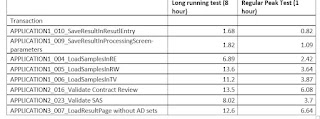
 Performance Testing team had shared the below report where they had observed slowness in long running test after 1.5 hours, which they don’t notice in shorter tests for an hour long


I could figure out that the issue was with  the Database.  If you see the below snapshot from AppDynamics, Resource semaphore wait stats in sql server had increased during the middle of the load test.


I had gathered few additional statistics from Grafana to understand the root cause and found that the applications slowed down and server memory reached its limit (84 GB )and resource semaphore events were getting triggered as shown in the image below


Next step is to determine which query is causing the issue. So I ran DMV in SQL server to determine the same.

 SELECT der.session_id ,

DB_NAME(der.database_id) AS database_name ,

deqp.query_plan ,

SUBSTRING(dest.text, der.statement_start_offset / 2,

( CASE WHEN der.statement_end_offset = -1

THEN DATALENGTH(dest.text)

ELSE der.statement_end_offset

END - der.statement_start_offset ) / 2)

AS [statement executing] ,

der.cpu_time

--der.granted_query_memory

--der.wait_time

--der.total_elapsed_time

--der.reads

FROM sys.dm_exec_requests der

INNER JOIN sys.dm_exec_sessions des

ON des.session_id = der.session_id

CROSS APPLY sys.dm_exec_sql_text(der.sql_handle) dest

CROSS APPLY sys.dm_exec_query_plan(der.plan_handle) deqp

WHERE des.is_user_process = 1

AND der.session_id <> @@spid

ORDER BY der.cpu_time DESC ;

-- ORDER BY der.granted_query_memory DESC ;

-- ORDER BY der.wait_time DESC;

-- ORDER BY der.total_elapsed_time DESC;

-- ORDER BY der.reads DESC;


 Output of the DMV gave us the Culprit. it  is a query requesting around 16GB of Server memory (memory grant) for execution. This query needs server memory to store temporary data while sorting and joining rows.

Note:  The amount of the workspace memory for a query is called a memory grant. A memory grant is calculated during the query compilation and then, when the execution should start, this amount is requested and, depending on the available memory, granted to a query.

Solution : Tune the sql query to reduce memory usag. Development team had given the fix in  a day and that solved the problem


Why Late-Stage Release Scope Control Fails (And How to Fix It)

  Why Late-Stage Release Scope Control Fails (And How to Fix It) Enforcing strict scope control right before a major release often backfires...